
The 3B Wall: What Apple’s On-Device LLM Can and Can’t Do in Your Shell
Apple quietly shipped a 3B-parameter LLM on every Mac running macOS Tahoe. It sits on the Neural Engine, powers Siri and Writing Tools, and is accessible through the FoundationModels Swift framework, but there’s no direct way to use it outside of building a custom app.
apfel changed that. A Swift CLI that wraps FoundationModels and gives the on-device model a command-line interface. It hit the front page of Hacker News and proved the model was usable from the terminal. That got me thinking: what if I built something more specialized?
macOS’s default shell, zsh, has hooks that fire before you run a command, when a command isn’t found, and after a command fails. They’ve always been there, but the options were either deterministic (Levenshtein-based “did you mean”), or an LLM that’s either too slow locally or requires a cloud roundtrip. A 3B model on the Neural Engine responding in under a second changes the tradeoff.

I wired all three hooks to the on-device model. It worked for simple things, then started hallucinating flags. So I benchmarked multiple approaches across 100 prompts to find out what actually helps, built the winning approach into a CLI called hunch, and learned something about where the 3B wall actually is.
The three hooks
zsh has three built-in extension points that fire at specific moments in the command lifecycle. Each one is a natural place to put an LLM call:
| Hook | When it fires | What I wired it to |
|---|---|---|
zle widget (Ctrl+G) |
Before you run a command | Natural language → shell command. Replaces the buffer, you inspect before hitting Enter. Never executes anything. |
command_not_found_handler |
Command isn’t in $PATH |
gti push → did you mean: git push. ip a → did you mean: ifconfig. |
TRAPZERR |
Non-zero exit code | One-line explanation of what went wrong, in dim grey. Skips signals, benign exits (grep no-match, diff), and commands containing tokens or passwords. |
The Ctrl+G hook is the main one. Type a description, hit Ctrl+G, the buffer gets replaced:

The key safety property: Ctrl+G never runs anything. It fills the buffer. You always read before you execute.
The 40% baseline
Simple commands work. Typo correction is reliable. But the moment you ask for anything with specific flags, the model hallucinates.
find files changed in the last hour →
find . -mtime +1h
This is wrong in three ways (-mtime counts days, + means “more than,” the h suffix doesn’t exist). The correct command is find . -mmin -60.
I ran 100 prompts (31 simple, 51 flag-heavy, 18 composed) and scored each result. Baseline: 40% usable. 60% wrong.
The model is also oblivious to macOS. “Show my IP address” returns ip a, a Linux command that doesn’t exist on macOS. It doesn’t know pbcopy, caffeinate, mdfind, pmset, or sips. It reaches for systemctl, lsusb, iwconfig every time.
Some hallucinations are dangerous. Asked for a soft git reset, it generated git reset --hard HEAD~1, which destroys uncommitted changes. This is why Ctrl+G never executes anything.
What I tried
I tried a few approaches to improve accuracy. They fall into four categories.
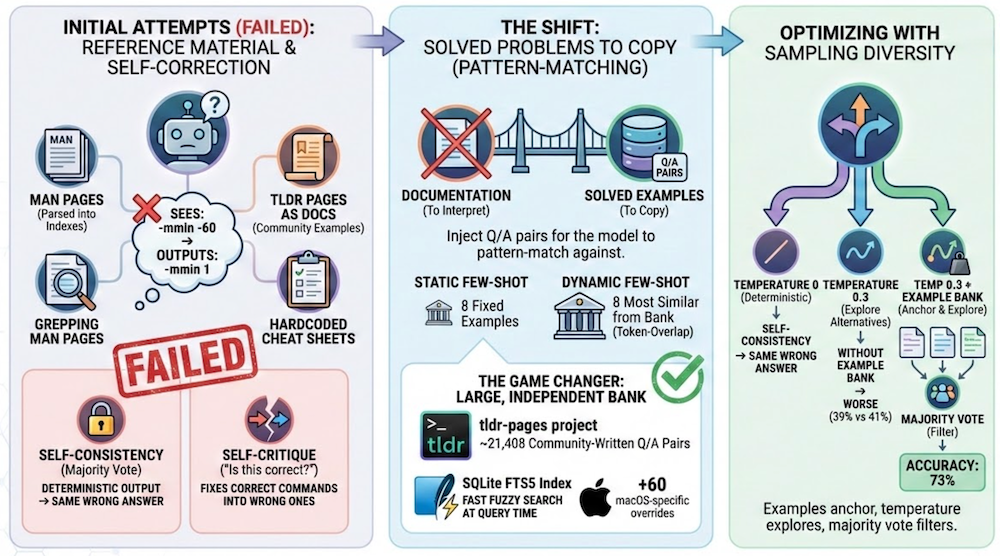
Help the model reason better. Give it reference material so it can look up the right flags. I tried parsing man pages into flag indexes, fetching tldr pages as documentation, grepping man pages for relevant keywords, and hardcoding cheat sheets in the system prompt. The model sees the right flag in the docs but can’t reason about it and apply it.
Let the model self-correct. Self-critique (“is this correct for macOS? if not, fix it”) and Apple’s @Generable constrained decoding both failed. The model “fixes” correct commands into wrong ones. Self-consistency (majority vote) didn’t help on its own either, though it becomes useful later when combined with the example bank.
Give it solved problems to copy. Instead of documentation, inject Q/A pairs the model can pattern-match against, like “find files larger than 100MB” → find . -size +100M. Static few-shot uses 8 fixed examples. Dynamic few-shot picks the 8 most similar from a bank using token-overlap similarity. Accuracy depends on bank size. I went back to tldr, this time using it as solved examples instead of documentation: 20k+ community-written Q/A pairs for ~3k commands, parsed into a SQLite FTS5 index. That alone got accuracy to ~68%. Adding targeted macOS overrides, tiered retrieval (overrides → macOS-specific → common), a tuned prompt, and lightweight command validation pushed it to ~83%.
Add sampling diversity. At temperature 0 the model is mostly deterministic, but not fully: accuracy swings 64–76% across runs even with the same prompts. Without the example bank, raising temperature to 0.3 with 3 samples actually makes things worse (39% vs 41%). On top of the example bank, self-consistency kills the variance: 67–69% range (2pp) instead of 64–76% (12pp). Same average, but you know what you’re getting. For a tool you use dozens of times a day, predictability matters. Tradeoff: 1.3s instead of 0.4s.
| Approach | What it does | Usable | Avg Time |
|---|---|---|---|
| hunch (shipped) | dynshot-tldr + tiered retrieval + overrides + tuned prompt + validation | ~83% | 0.5s |
| dynshot-tldr + sc | dynshot-tldr with temp 0.3, 3 samples, majority vote | ~68% (±1pp) | 1.3s |
| dynshot-tldr | 8 similar examples from 21k tldr Q/A pairs (FTS5) | ~68% (±6pp) | 0.4s |
| fewshot | 8 static hand-picked examples | 43% | 1.1s |
| permissive | bare prompt, relaxed guardrails | 41% | 0.3s |
| selfconsist | 3 samples, majority vote (temp 0) | 41% | 1.1s |
| minimal | bare prompt | 40% | 0.4s |
| minimal + sc | bare prompt, temp 0.3, 3 samples, majority vote | 39% | 1.3s |
| tldr | tldr page fed as documentation context | 38% | 1.4s |
| manindex | man page parsed into flag index | 37% | 1.5s |
| verify | generate then self-critique | 33% | 0.7s |
The full benchmark suite (100 prompts, all approaches, raw results) is in the hunch repo.
The 3B wall
The benchmark results tell a specific story about what this model can and can’t do.
It can’t reason from documentation. I gave it man page flag indexes, tldr pages as context, cheat sheets, targeted doc sections. It finds the right flag name (it sees -mmin) but outputs -mmin 1 instead of -mmin -60. The +n/-n/n semantics are beyond what it can derive from a description. Man page keyword grep fails too: man pages don’t use words like “hour” or “changed,” so naive search returns nothing. None of these approaches beat a bare prompt.
It can’t self-correct. Self-critique dropped accuracy to 33%: worse than baseline. The model “fixes” correct commands into wrong ones. Chain-of-thought is even more revealing: forced to show its reasoning, the model confabulates. When it outputs makepasswd instead of openssl rand, the reasoning field says “makepasswd is a macOS-specific command.” It isn’t. The 3B doesn’t reason through CoT: it invents plausible justifications for wrong answers.
It can copy patterns. Give it "find . -mmin -60 finds files in the last hour" as a literal example and it outputs correctly, because it copies, not reasons. That’s why few-shot examples work and documentation doesn’t. Self-consistency doesn’t improve accuracy, it improves reliability. Without examples, sampling explores variations around a wrong center. With examples, it narrows the spread around a roughly-right center. Same average, less variance.
The precise claim: Apple’s 3B on-device model can classify intent and copy patterns but cannot reason over documentation to derive correct usage. The model knows what tool to reach for but doesn’t know how to hold it.
The meta-lesson: the right question for a small on-device model isn’t “can it do this task?” but “can I decompose the task so the model only does the parts it’s strong at?”
hunch
The dynshot-tldr approach worked well enough that I built it into hunch, a Swift CLI that calls FoundationModels directly (no apfel dependency), with FTS5 search and the tldr bank baked into a single binary.
brew install es617/tap/hunch
source ~/.local/share/hunch/hunch.zsh  # add to ~/.zshrc
~83% accuracy in 0.5s. In practice, the basics are reliable: simple commands, macOS-specific tools (pbcopy, caffeinate, pmset), git operations, network diagnostics, file operations. The example bank is extensible: you can add your own overrides for tools or workflows the community examples don’t cover. Temperature and sample count are configurable via CLI flags or environment variables. Everything runs on the Neural Engine. No cloud, no API keys, no data leaves your Mac.
A couple of things to know: FoundationModels is Tahoe only (macOS 26, Sequoia and earlier don’t have it), and Apple’s guardrails are inconsistent. kill whatever is using port 3000 returns empty because the word “kill” triggers the safety filter. hunch uses permissiveContentTransformations to avoid false positives.
What this means
The model is bad at generating syntax but good at classifying intent and picking from options. That’s exactly what tool-calling requires, and FoundationModels supports it.
A 3B model that picks the right tool, passes the right arguments, and summarizes the result is more useful than one that tries to generate correct code from scratch. The right question for a small on-device model isn’t “can it do this task?” but “can I decompose the task so the model only does the parts it’s strong at?”
And it all runs locally. No roundtrip, no API key, no data leaving the machine. For anything latency-sensitive or privacy-sensitive, that matters. Every Tahoe Mac already has this capability sitting idle on the Neural Engine. hunch is one way to use it. There will be others.