
Training Apple’s On-Device LLM: LoRA, QLoRA, and What Actually Worked
In the previous article, I benchmarked Apple’s on-device 3B model for shell command generation and got it to ~80% accuracy using retrieval (dynamic few-shot examples from a 21k-entry bank). That was the ceiling I could reach without touching the model’s weights, or growing the bank size.
Apple’s FoundationModels framework also supports custom adapters. You can train LoRA weights, export them as .fmadapter files, and load them at inference time. The model stays frozen; you’re adding a small set of correction matrices that steer its outputs. This is the next logical step — not because I plan to ship adapters (distributing ~160MB adapter files for a lightweight CLI isn’t practical), but to understand the training experience: what does Apple’s toolkit look like, what does it take to get training running on accessible hardware, and do the resulting adapters actually work?
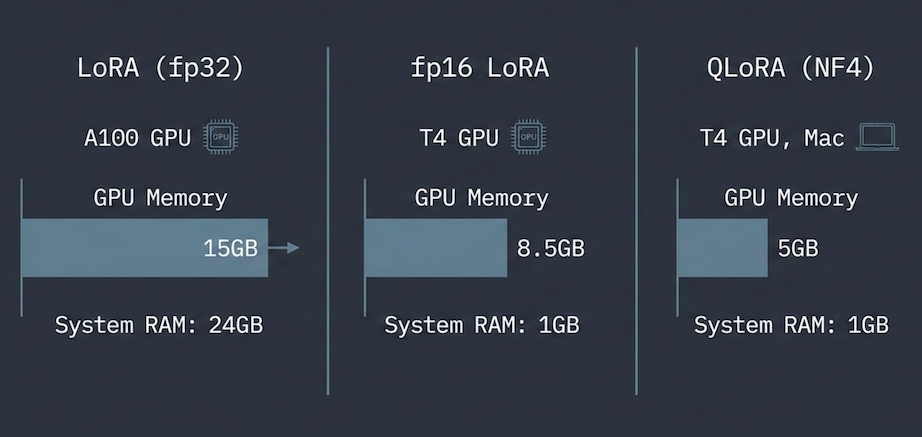
The short version: the toolkit assumes a beefy GPU, but with some work I got training running on a free Colab T4 and eventually on a Mac. The adapters work — and the training method and platform don’t matter much. Along the way I found a caching bug in Apple’s inference service that silently consumed 269GB of disk space.
Disclaimer (April 2026): There is a known bug where loading adapters from a command-line tool leaks ~160MB per invocation to a SIP-protected cache with no cleanup. Apple has confirmed this is specific to CLI tools — app bundles are not affected. I detail the bug below. The shipped version of hunch does not use adapters, so this doesn’t affect normal usage.
A quick primer on LoRA
If you’re not familiar with how adapter training works, here’s the short version.
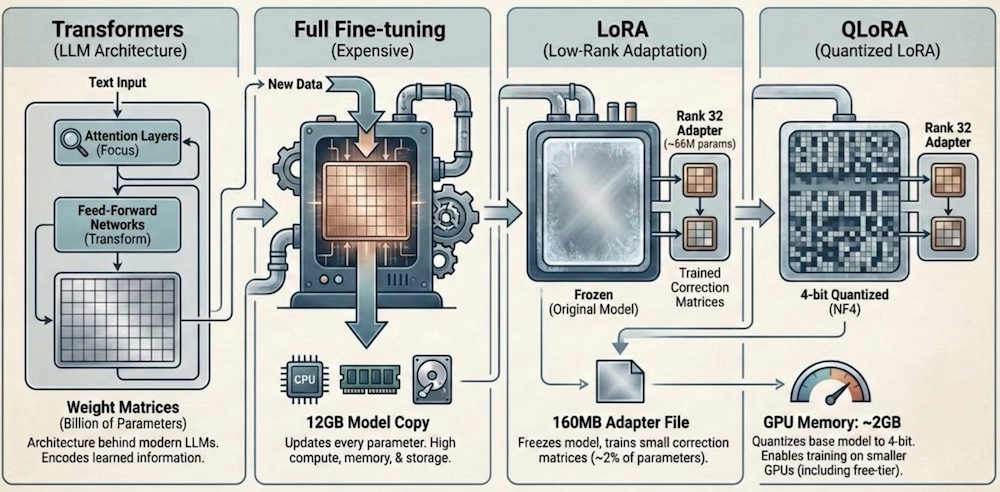
Transformers are the architecture behind modern LLMs. They process text through layers of attention (deciding which parts of the input to focus on) and feed-forward networks (transforming representations). Each layer has large weight matrices, millions of parameters that encode what the model has learned.
Fine-tuning means updating those weights on new data so the model learns new behavior. Full fine-tuning updates every parameter, which for a 3B model means moving ~12GB of weights through the optimizer. It’s expensive in compute, memory, and storage.
LoRA (Low-Rank Adaptation) is the shortcut. Instead of updating the full weight matrices, you freeze the original model and attach small “correction” matrices to specific layers. If a weight matrix is 2048×2048 (~4M parameters), LoRA decomposes the update into two small matrices: 2048×32 and 32×2048 (~131K parameters). The rank (32 in this case) controls how much capacity the adapter has. You train only these small matrices. Across all 56 transformer layers in Apple’s 3B model, that works out to ~66M trainable parameters, about 2% of the full model. The result is a ~160MB adapter file instead of a 12GB model copy.
QLoRA goes one step further. It quantizes the frozen base model to 4-bit precision (NF4 format), compressing it from ~12GB to ~2GB in GPU memory. The LoRA matrices themselves stay in higher precision for training stability. The practical effect: you can train on GPUs with much less memory, including free-tier ones.
Apple’s toolkit and the hardware wall
Apple ships an Adapter Training Toolkit, a Python package (~12GB including base model weights) that handles data loading, LoRA configuration, training loops, and export to the .fmadapter format. The official requirements are “Mac with Apple silicon and at least 32GB memory, or Linux GPU machines.”
In practice, the memory requirements are steep. The base model is 12GB in fp32. The toolkit loads it without memory mapping, so during loading the checkpoint and the model parameters both live in system RAM — ~24GB peak. The GPU side needs ~15GB for the training loop. But the system RAM spike is the real bottleneck: a Colab T4 has 16GB VRAM but only 12GB system RAM, so training OOMs before it even reaches the GPU. I used an A100 (80GB system RAM) where this isn’t an issue. A 32GB Mac might technically fit, but it’s tight. My 24GB MacBook Air M4 OOM’d immediately.
The memory breakdown is straightforward once you look at the loading pipeline, and each bottleneck has a fix. Getting it to run on a free Colab T4 and eventually on a Mac took three iterations.
Getting training onto a free T4
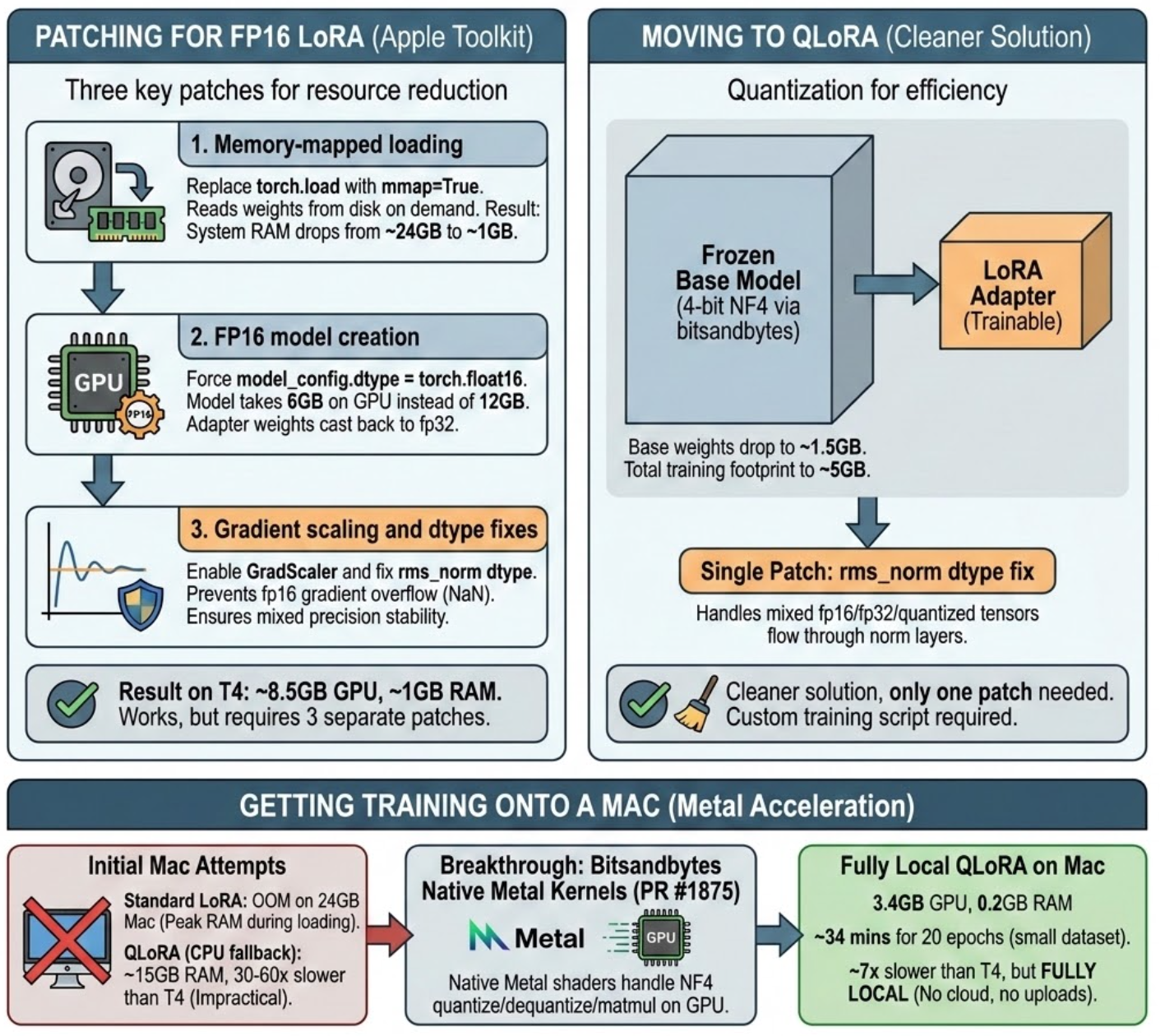
A Colab T4 has 16GB VRAM and only 12GB system RAM. The ~15GB training footprint barely fits on the 16GB GPU, but the ~24GB loading spike doesn’t fit in system RAM — training OOMs before it starts. My first attempt was patching Apple’s pipeline directly. Three changes:
- Memory-mapped loading. Replace
torch.loadwithmmap=Trueto read weights from disk on demand instead of materializing 12GB in RAM. System RAM drops from ~24GB to ~6GB. - fp16 model creation. Force
model_config.dtype = torch.float16so the model takes 6GB on GPU instead of 12GB, with adapter weights cast back to fp32 for gradient scaling. - Gradient scaling and dtype fixes. Apple’s training script only enables
GradScalerfor a precision mode that isn’t exposed as a CLI option. Without it, fp16 gradients overflow to NaN. A separate fix inrms_normcasts weight tensors to match input dtype in mixed precision.
With all three patches, fp16 LoRA trains on a T4: ~8.5GB GPU, ~6GB RAM. It works, but it’s three patches to Apple’s code and still uses over half the T4’s memory.
QLoRA is cleaner. It quantizes the frozen base model’s Linear layers to 4-bit NF4 via bitsandbytes, dropping the base model to ~2GB and total training footprint to ~5GB. The rms_norm dtype patch is still needed (mixed fp16/fp32/quantized tensors flow through norm layers), but only one patch instead of three. I wrote a custom training script around it since the toolkit doesn’t support quantized training natively.
| LoRA (fp32) | fp16 LoRA | QLoRA (NF4) | |
|---|---|---|---|
| Training footprint on GPU | ~15GB | ~8.5GB | ~5GB |
| System RAM peak | ~24GB | ~6GB | ~6GB |
| Toolkit | Apple’s, unmodified | Apple’s, 3 patches | Custom script (1 shared patch) |
| Cost | Colab Pro | Free | Free |
Getting training onto a Mac
Standard LoRA OOM’d on my 24GB Mac — the ~24GB RAM peak during model loading leaves nothing for training. QLoRA with mmap loading fits comfortably at ~5GB GPU, but trains ~9x slower than a free Colab T4. The bottleneck: bitsandbytes has no native MPS kernels in its current release (0.49.2), so NF4 dequantization falls back to CPU.
bitsandbytes recently merged native Metal kernel support into main, expected in v0.50.0. Installing from git (pip install git+https://github.com/bitsandbytes-foundation/bitsandbytes.git) brings lower GPU memory usage and ~2x faster training on the short override dataset that produces the best adapters, cutting the T4 gap from ~9x to ~4x. Slower, but fully local — no cloud, no uploads, no Colab session management. And the adapter quality is identical.
Do the adapters actually work?
With the training infrastructure in place, I needed to verify the adapters actually improve the model. I trained on two datasets: the full 21k tldr bank, and a small set of curated overrides (~96 total, reduced to ~57 after excluding benchmark prompts to avoid data leakage) I’d hand-written to fill gaps in the model’s knowledge (macOS-specific commands, flag corrections, common mistakes).
The full bank made things worse: the adapter learned noise from 4,500 different commands and interfered with retrieval. The overrides worked. Not a surprising result (targeted data beats noisy data), but it confirmed the pipeline produces usable adapters.
| Approach | Trained on | Exact Match | vs Retrieval Baseline |
|---|---|---|---|
| QLoRA override + retrieval | Mac | ~86% | +6pp |
| LoRA override + retrieval | A100 | ~85% | +5pp |
| QLoRA override + retrieval | T4 | ~85% | +5pp |
| Retrieval only (shipped) | — | ~80% | reference |
| QLoRA override only | Mac | ~76% | -4pp |
| QLoRA override only | T4 | ~74% | -6pp |
| Bare model | — | ~41% | — |
The important comparisons for validating the training pipeline:
Adapters work. Standalone, they lift the bare model from ~41% to ~74-76%. Combined with retrieval, accuracy pushes into the ~85-86% range. Retrieval alone averages ~80% (with variance up to ~83% across runs), so the gain is modest but consistent across all training methods and platforms.
LoRA ≈ QLoRA ≈ Mac. All three paths land in the same range: ~85-86% with retrieval, ~74-76% standalone. QLoRA on a free T4 produces the same quality adapter as full LoRA on a paid A100, and Mac-trained adapters match both.
Pushing accuracy higher wasn’t the goal here. The point was to verify that adapters trained across different methods (LoRA, QLoRA) and platforms (A100, T4, Mac) all produce equivalent results, and that the cheaper paths don’t sacrifice quality.
The bug: invisible disk consumption
While running adapter benchmarks, my 500GB SSD dropped to 10GB free, but du showed only ~230GB used. The missing space was invisible to every standard macOS tool, even sudo.
The cause: each call to SystemLanguageModel.Adapter(fileURL:) triggers Apple’s inference service to write a full ~160MB copy of the adapter to a SIP-protected cache directory (/private/var/db/AppleIntelligencePlatform/AppModelAssets/). Each copy gets a unique hash and there’s no cleanup. Over ~300 benchmark runs: 1,684 cached copies, ~269GB. Only visible from Recovery Mode (which bypasses SIP).
Apple has confirmed the bug is specific to command-line tools — app bundles are not affected. To reclaim space, boot Recovery Mode and delete the cache directory contents.
Where this leaves us
The toolkit works. You can go from dataset to working on-device adapter in an afternoon. But the experience is firmly an ML engineer’s workflow: Python scripts, PyTorch, bring-your-own-GPU, debug your own dtype mismatches. If you’ve fine-tuned models before, you’ll feel at home. If you’re an iOS developer who’s never touched a training loop, there’s a steep ramp.
Apple has a track record of eventually abstracting these workflows. Create ML turned image classification and object detection training into a drag-and-drop Xcode experience. It’s easy to imagine a similar path here — a “Create LLM” that wraps the toolkit into something Xcode-native, with managed training on Apple silicon and one-click export to .fmadapter. The pieces are all there; the developer experience just hasn’t caught up yet.
I’m not shipping adapters with hunch; ~160MB per adapter doesn’t fit a lightweight CLI, independently from the bug. But the training pipeline, patches, and notebooks are in the hunch repo with a training guide if you want to try it yourself:
- LoRA notebook — end-to-end pipeline around Apple’s toolkit (needs a 24GB+ GPU)
- fp16 LoRA notebook — same pipeline with three patches to run on a free Colab T4
- QLoRA notebook + training script — 4-bit quantized training via
bitsandbytes, runs on a free T4 or locally on Mac - MPS setup instructions — installing bitsandbytes from main with native Metal kernels
- Bug workaround — batch mode for the adapter caching leak, and Recovery Mode cleanup